

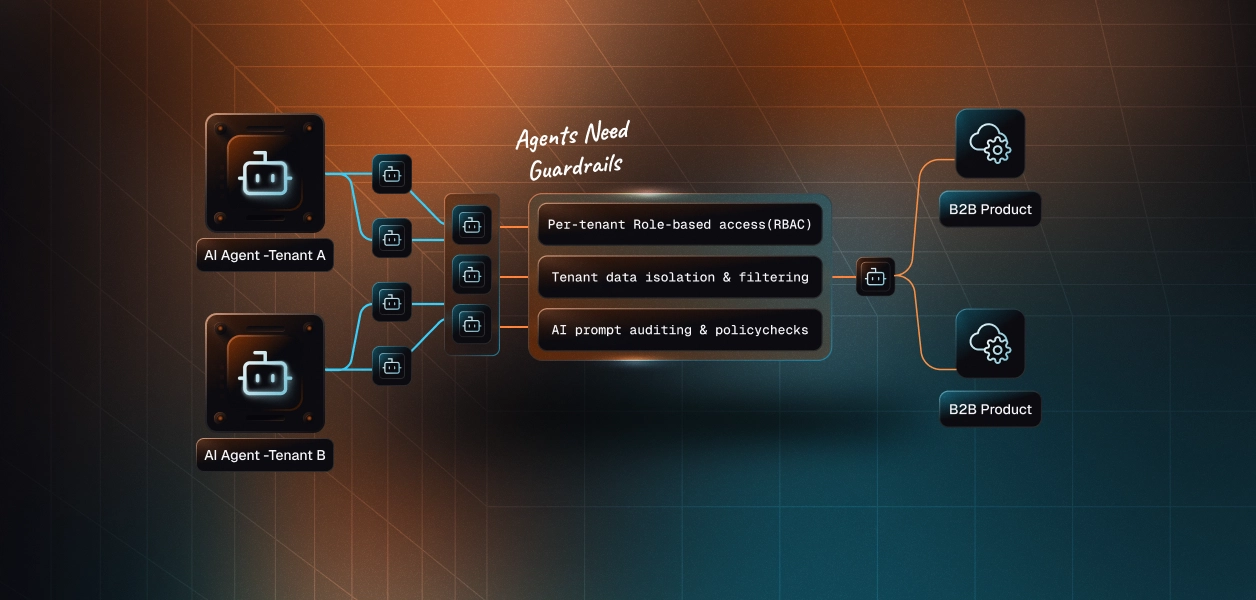
Ask any developer who’s built a multi-tenant product about their first permissions bug. More often than not, it’s due to a customer seeing someone else’s data. The fix is small, but the root cause is a giant change in the codebase: different authors at different points in time sprinkled access logic throughout controllers, queries, and middleware.
Teams often consider adding tenant checks to every endpoint alongside an account layer, but the underlying rationale goes beyond access control. It starts with the principle of separation of concerns. An account layer consolidates identity, membership, and access rules into a centralized service, allowing product developers to build features without repeatedly implementing tenant-specific logic. Why use an account layer? It reduces duplicated logic, simplifies development, and establishes a consistent foundation for managing users, permissions, and tenant boundaries across applications.
Understanding the Account Layer in Multi-Tenant Architecture
An account layer is a common base layer of descriptions of users, organisations, memberships, roles, and their relationships. It’s the heart of every request, answering one question each time: “Can this user do this in this tenant or not?”
Core Building Blocks
Some concepts are common across most layers of an account. Users: Users are people. Customers represent tenants (that is, tenants or workspaces or organisations). Each has assignments (and memberships). Permissions determine how each role behaves. Having these pieces in one place means they can be used across all product features.
Authentication vs. Authorisation
Authentication is the “Who Am I?” question. It doesn’t tell you who your tenant is or what you can do in it. A session in a settings store. An account layer creates a tenant-aware context of that session that your code can trust.
Development Challenges an Account Layer Helps Avoid
Shortcuts are punished by multi-tenancy. Three common problems in codebases that omit a dedicated layer:
-
Absence of a Central Tenant Check
Tenant filters everywhere, subdatabase queries, no central layer, developers. A missed filter leaks data. Chasing down missing conditions on every pull request causes “review fatigue.”
-
Inconsistent Role Logic
One service considers an “admin” to be someone who manages billing. Another treats an admin as an “all” manager. The definitions differ, and the users have confusing behaviour.
-
Delayed New Engineer Onboarding
New hires must learn to manage access for every module to be able to ship safely. Instead, the account layer is a flood of information on what would be tribal knowledge.
Improving Development Productivity with an Account Layer
Security is the main focus of the press, but the real benefit is speed and clarity.
Fewer Decisions Per Feature
If a developer builds a new feature, there are default answers to access questions. They call the layer, get a decision, and move on. That consistency results in less design conversation and review time.
Fail-Safe Behaviour
A sufficient layer would automatically apply a default scope to any given query, for the tenant at hand. Developers need to opt out explicitly rather than opt in deliberately. And that’s a nice risk profile.
Simpler Testing
Centralised access rules make testing easier. We are able to build a mock for users with different tenants, roles, and tests with the use of our fixture. Bugs show up in CI, not a support ticket.
Supporting Different Tenant Isolation Strategies
There are various isolation levels, and the account layer should be able to support all of them; there is no need to rewrite it.
Logic-Based Separation
Tenants share tables with rows separated by a tenant identifier. This is typical in early products and inexpensive. This layer adds the identifier to all read/write operations.
Database and Schema Isolation
Some customers require greater separation, particularly in regulated industries. By giving the requesters dedicated schemas or databases, it will route every query to the right place.
Comparing Access Control Models
The approach you take will dictate your architecture for years to come. There are many concrete differences to compare these two approaches:
- Inline checks in your app code: Easy to start, but scattered across access logic in many places. Requires audits and refactoring.
- Single-tenant apps are fine. Role · only on the framework level. Does not work if the users have differing roles in multiple orgs.
- Special account layer: A single service for membership, roles, and tenant context. Only one change can be made.
Building an Effective Account Layer
“The perfect is the enemy of the delivered.” Start with the smallest model that will work for your real customers.
Start with Roles and Add Granularity Gradually
Three to four roles (owner, admin, member, viewer) cover most early needs. Hold off on fine-grained permissions until customers request them. Complex functionality at the beginning leads to bugs and confused users.
Provide a Clean Interface
Expose some well-named functions, or middleware, to developers. “Require role in current tenant” is understandable, and hides the mechanism.
Log Each Access Decision
Log who requested what, in which tenant, and whether the layer allowed it. These logs help speed up debugging and answer the support teams when customers ask: “Why can’t I see this page?”
Common Mistakes Teams Make
Some teams bake tenant IDs into URLs and trust blindly. Some only have one state, with an active tenant of a user only in the client-state. Both approaches can be abused. The layer should acquire tenant context via server-validated data on every request. Ignored invites and offboarding is another common problem. Users are hopping between tenants, and the layer has to handle those lifecycle events neatly from day one.
Additional Reading
Adding more teams, integrations, and automation to products only improves design access. UR has more to say for developers looking for more perspective on three models: user, tenant, and account.
Conclusion: The Value of an Account Layer in Multi-Tenant Architecture
The case for an account layer is straightforward: access decisions need a single place to live. It’s fewer surprises for reviewers, one home for identity, membership, and permissions for developers, and confidence from customers that their data remains their data.
Teams that pay down early enjoy speedy feature delivery, lean tests, and a codebase welcoming new engineers. They skip the nasty rewrite after the first massive data leak. “Make your layer buildable, not spongy, so others will build on top of your layer.”
