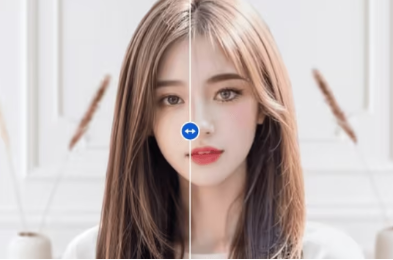
Face filter apps have transformed the way we take and edit photos, offering endless possibilities for enhancing selfies, expressing creativity, and even experimenting with virtual makeovers. Powered by advanced augmented reality (AR) and artificial intelligence (AI) technology, these apps are now enabling users to do much more. Below, we’ll explore the various things you can do with face filter apps and why they’ve become a staple for both casual users and social media influencers.
What Are the Key Features and Uses of Face Filter Apps?
From improving selfies to creating entertaining content, face filter apps offer diverse functions that cater to a wide range of needs. Let’s look at what makes these apps so versatile.
1. Enhance Your Selfies with Beauty Filters
One of the primary uses of face filter apps is enhancing your selfies with beauty filters. These tools offer options like skin smoothing, teeth whitening, and eye brightening to help you look your best. Apps like Facetune and AirBrush can even adjust face shapes, slim down facial features, and remove blemishes, giving you a polished look without the need for professional retouching skills.
2. Experiment with Virtual Makeup and Hairstyles
Face filter apps are not limited to traditional photo editing. Many apps like YouCam Makeup now offer virtual makeup and hairstyle try-ons that let you see how different products and styles would look on you. This is perfect for anyone looking to experiment with their appearance or try a new beauty trend without making a permanent change.
3. Create Fun and Whimsical Effects
If you’re looking to add a bit of fun to your photos, face filter apps have a wide range of whimsical effects to choose from. From animal ears and floral crowns to fantasy-themed overlays and animated stickers, these apps offer endless creative options. Apps like SNOW and B612 are packed with quirky filters and AR effects that let users transform themselves into cute characters or surreal avatars.
4. Transform Your Look with Face Swapping and Face Morphing
Face filter apps are also known for their advanced face-swapping and morphing features, allowing users to swap faces with friends, celebrities, or even characters. Apps like Reface use AI technology to realistically swap faces, creating hilarious and sometimes eerie results. You can even use these features to put your face into popular movie scenes or create a mashup of two people’s facial features.
5. Record Videos with Real-Time Effects
Face filter apps aren’t just for photos—they can also be used to create engaging videos. Apps like Instagram and TikTok have integrated AR face filters that can be applied in real-time while recording videos. Whether you’re filming a funny clip or creating a dramatic effect for a short video, these face filters add visual interest and make your content stand out.
6. Enhance Your Live Streams and Video Calls
Another exciting use of face filter apps is in live streams and video calls. Many apps now support real-time beautification and effects during live broadcasts. Platforms like YouCam Live and Snap Camera offer face filters that can be used during video chats on platforms like Zoom and Skype, letting you enhance your appearance and have fun during virtual meetings.
7. Add Text and Graphics for Social Media
For those who want to share their creations on social media, face filter apps often include tools to add text, stickers, and other graphics. This feature is useful for creating memes, adding captions, or making your photos more interactive. Apps like PicsArt and Canva allow users to layer text and design elements over their images, turning simple selfies into compelling social media content.
Conclusion
Face filter apps are far more than just beauty enhancers – they offer a broad range of creative possibilities for selfies, videos, and live content. Whether you’re looking to refine your look, add fun effects, or create professional-quality visuals for social media, these face filters have something for everyone. So, dive in, explore, and let your imagination run wild!