



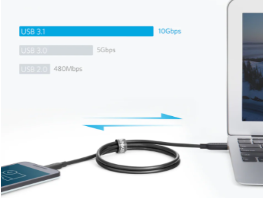
Choosing the right USB-C charging cable for your device is essential to ensure fast charging, data transfer, and overall device safety. With so many options available, it’s easy to get overwhelmed by varying prices, features, and quality levels. So are all usb c cables the same? The answer is no. Different cables come with different specifications, making it crucial to know what to look for before making a purchase. Here’s a guide to help you select the perfect USB-C cable for your device.
Factors to Consider When Choosing a USB-C Charging Cable
Let’s explore the essential points to consider when selecting the best USB-C cable for your specific needs.
1. Check the Cable’s Power Delivery Capabilities
The first thing to consider is the cable’s power delivery (PD) capacity. If you own devices like laptops, tablets, or fast-charging smartphones, you need a USB-C cable that supports high-wattage power delivery. Some cables support up to 100W, making them ideal for charging larger devices like MacBooks. Cables with lower power ratings, around 18W-30W, may work for smaller devices like smartphones but won’t be sufficient for power-hungry gadgets. Always check your device’s power requirements to match them with the appropriate cable.
2. Verify Data Transfer Speed Requirements
When buying a USB-C cable, it’s important to consider its data transfer capabilities, especially if you frequently transfer files between your phone, tablet, or laptop. Some cables are designed solely for charging, while others offer high-speed data transfer rates, such as USB 3.1 (10 Gbps) or even Thunderbolt 3 (40 Gbps). If you’re unsure, remember that not all USB-C cables are the same when it comes to data speed. Make sure to check for labels like “USB 2.0” or “USB 3.0/3.1” to ensure the cable meets your needs.
3. Consider the Cable’s Build Quality and Durability
Durability is crucial for charging cables, especially if you travel frequently or use your devices on the go. Look for cables made with high-quality materials like braided nylon or reinforced connectors, as they offer better resistance to bending and fraying. Anker, for example, is known for its robust cables that withstand heavy usage. Additionally, shorter cables are often more durable and tangle-free, while longer cables can offer more flexibility but might wear out faster if not properly stored.
4. Choose a Cable with Proper Safety Features
Safety is a major concern when choosing a USB-C cable, as low-quality cables can overheat and damage your device. To ensure safe charging, opt for cables that are USB-IF certified. USB-IF certification means the cable has been tested for safety and performance, ensuring that it meets industry standards. This is particularly important for high-power devices like laptops, as improper power delivery can lead to overheating or even permanent damage to the device.
5. Match the Cable to Your Device’s USB-C Standard
Understanding which USB-C standard your device supports will help narrow down your choices. USB-C cables come in various standards, such as USB 2.0, 3.1, and Thunderbolt 3. Devices with Thunderbolt 3 compatibility require a cable that supports high-speed data transfer and video output. On the other hand, basic USB-C 2.0 cables will suffice for simple charging and low-speed data transfer. Before buying, double-check your device’s manual to determine its standard and choose a compatible cable.
Conclusion
Choosing the right USB-C cable involves more than just grabbing the first one you see. Factors like power delivery, data transfer speed, build quality, and safety features should be carefully considered to ensure you get a cable that matches your device’s specifications. By keeping these tips in mind, you can confidently select a high-quality USB-C cable that will keep your devices charged and running efficiently.


